
For DaVinci Resolve Studio · macOSPremiere Pro coming soon

The multicam edit is already done.

SOLD CUT listens to every microphone, puts the right camera on screen and builds the whole edit on a copy of your timeline. Then it adds studio subtitles, vertical stories, react layouts and jump cuts. You finish in Resolve, like always.

Starts from the raw folder Your original timeline is never touched Works offline One licence, 2 Macs at once
Unedited screen recording · DaVinci Resolve Studio 21 · real time Episode 29 of our own podcast · 78 min · 5 cameras · cut by SOLD CUT, not by hand
0min

Episode length, two hosts, five cameras

0

Camera cuts, each on a real change of speaker

0

Subtitle lines, timed word by word

0s

Average shot, paced like our own edits

0

Frames changed in the original timeline

One episode, measured in the appBuilt by SOLD OUT MEDIA, a studio that edits podcasts for a living
Who makes it

Built by editors. Not by a startup.

SOLD CUT comes from SOLD OUT MEDIA, Romania's top podcast production team. We did not start with an idea for an app. We started with a backlog.

Week after week, show after show, we sat through the same hours: syncing cameras, switching angles on every change of speaker, building split screens by hand, cutting reels, fixing subtitles. Over the years we wrote down every problem, every shortcut, every rule our best editors follow without thinking, and turned them into tools for our own studio.

Hundreds of episodes later, those tools became SOLD CUT. You are not buying a generic AI plugin. You are buying our workflow and our years of experience, packed into one app for DaVinci Resolve.

100sof podcast episodes edited with this workflow
Yearsof rules from working editors, not from a lab
0subscriptions. Pay once, keep every update
How it works

Four steps. Then coffee.

SOLD CUT drives DaVinci Resolve Studio the way an assistant editor would, through Resolve's own scripting. You keep every decision; it does the hours of clicking.

  1. 01 — Start

    Drop in the folder. You don’t even open Resolve.

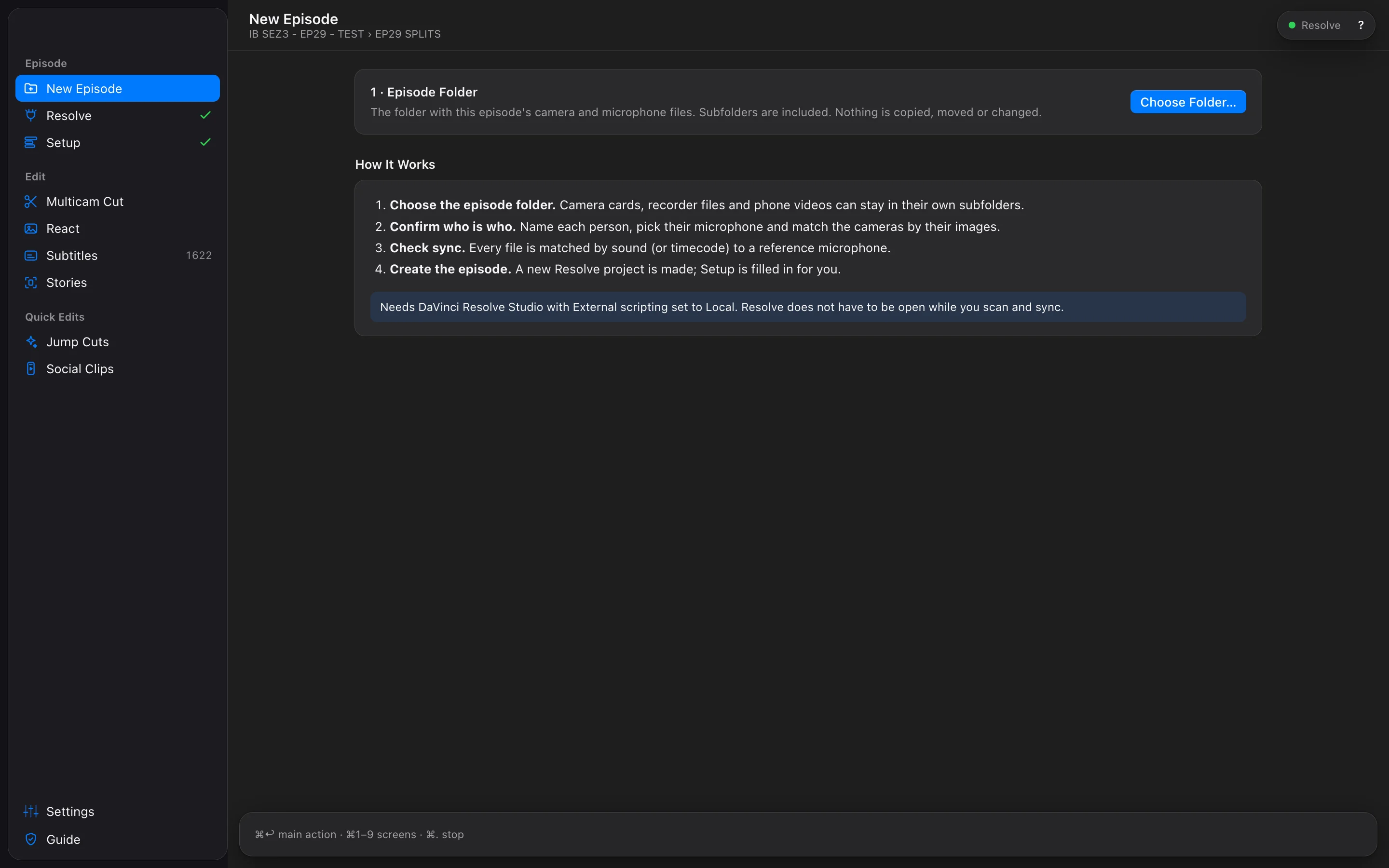
    Point New Episode at the folder with the camera cards and recorder files. SOLD CUT groups cameras and microphones, syncs everything by sound or timecode, starts DaVinci Resolve on its own and builds the project and the timeline. You only confirm who is who. Already have a synced timeline? Pick it and go.

    Sync by soundTimecodeMultitrack recorders
  2. 02 — Who is who

    Name the people. Match the cameras.

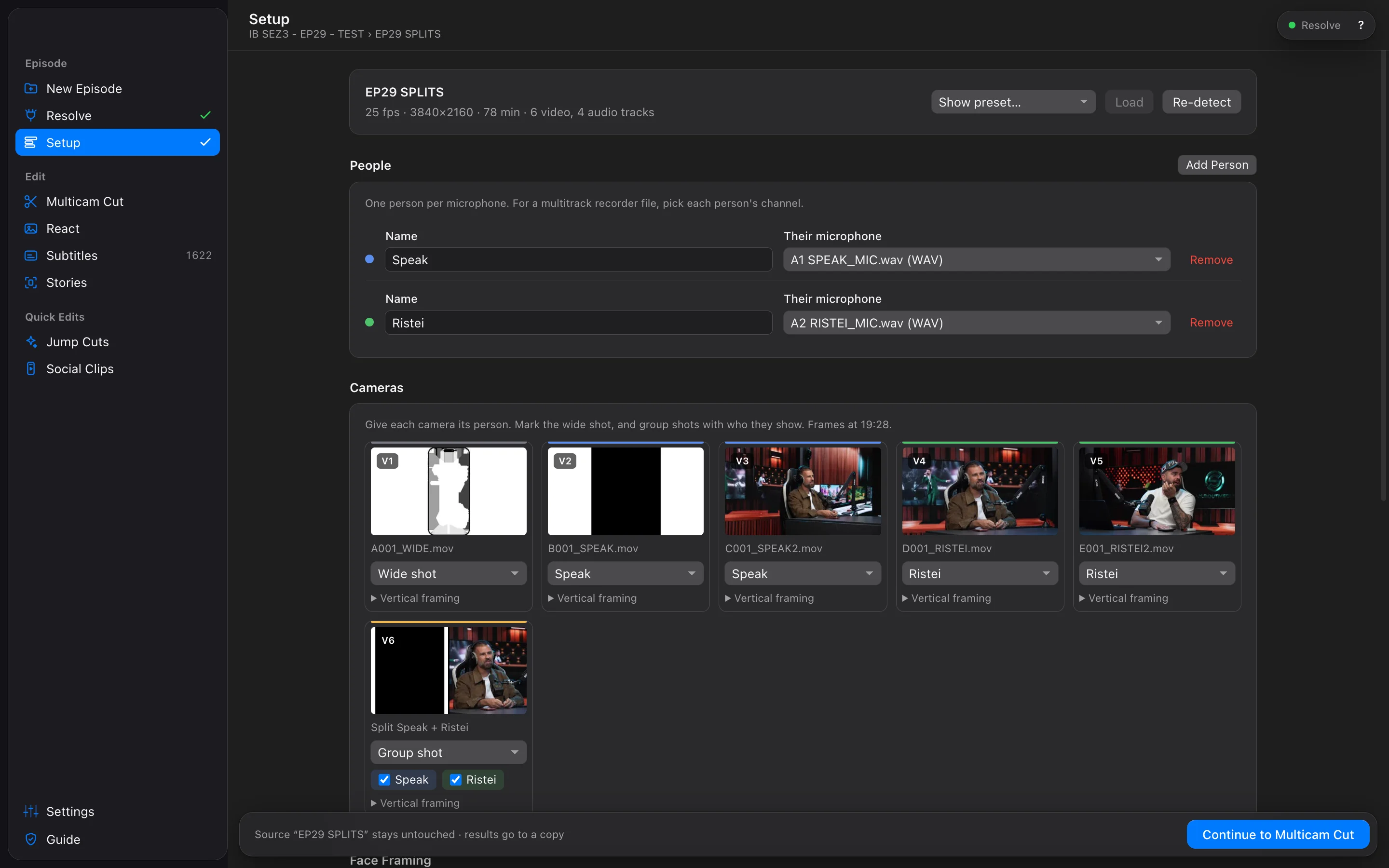
    Each person gets a microphone; each camera gets a person, the wide, a group shot or a split screen. Faces are found on your Mac and framed for vertical. Save it as a show preset and next week takes a second.

    2–10 peopleSplit screensShow presets
  3. 03 — Analyze

    See every cut before anything changes.

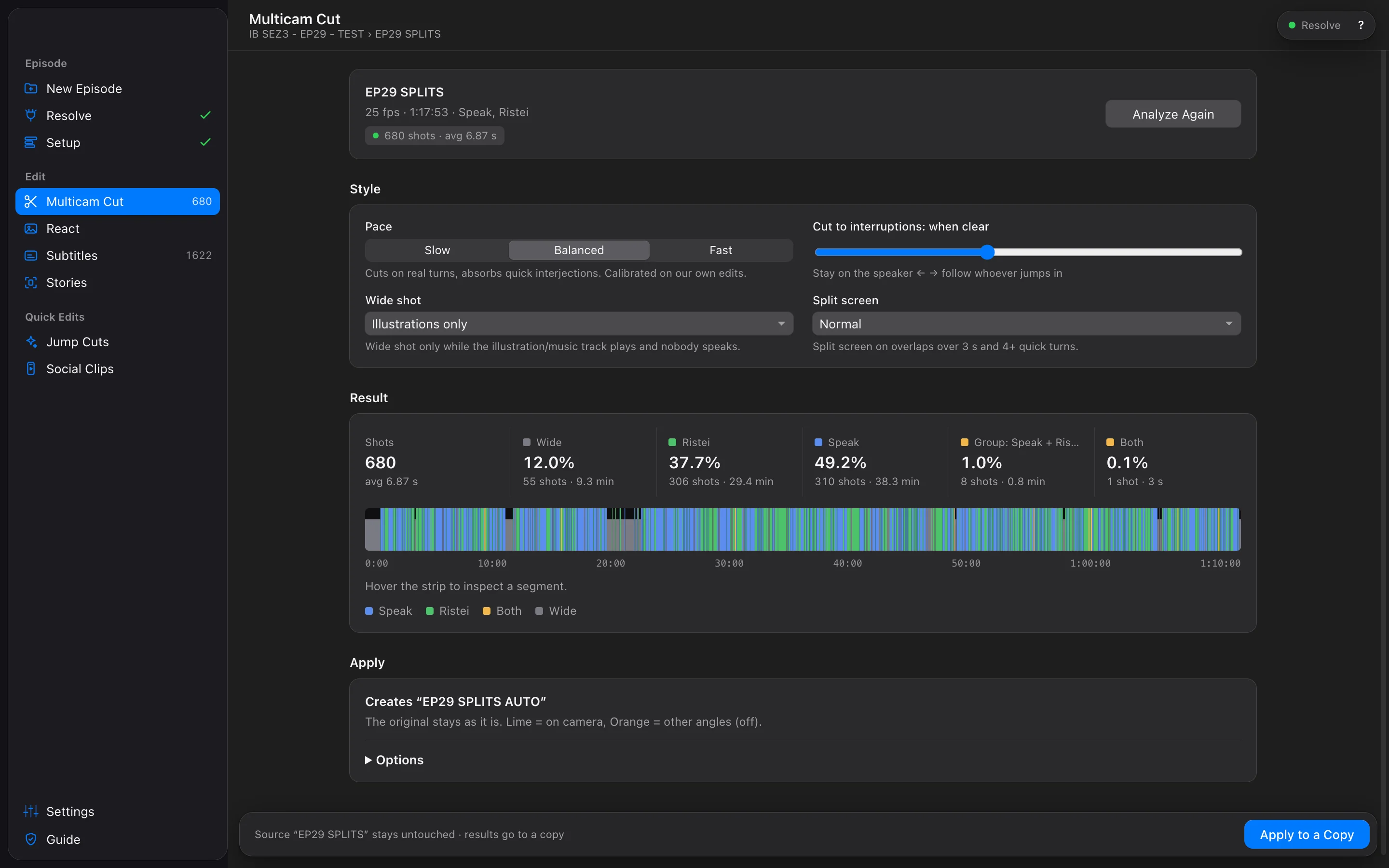
    The audio of every microphone decides who speaks, who interrupts and when to breathe on the wide. Pick a pace, read the shot breakdown, hover the strip. Nothing is written to Resolve.

    Slow · Balanced · FastInterruptionsWide shot rules
  4. 04 — Apply to a copy

    A finished edit, next to your original.

    "EP29 AUTO" appears in your project. The chosen angle is on, every other angle stays underneath, disabled, so any shot is one click away. Zoom, punch-ins and grades carry over.

    Non-destructiveAll angles kept⌘ Return
After the cut

Everything a podcast needs after the edit.

The multicam cut is the start. The same app turns the episode into subtitles, stories and clips, each on its own copy, each in Resolve where you can still change everything.

Subtitles

Studio subtitles that read the room.

Transcription runs on your Mac with Whisper large-v3. An optional AI review reads the whole episode first, then fixes misheard words from context, the way a good editor does.

  • Short cues, about a second, two lines of 26 characters, timed word by word
  • A cue that starts a few frames from a camera cut starts on the cut
  • Your studio look copied from any timeline, or ours
  • Numbers as digits, reels translated, every AI change can be refused
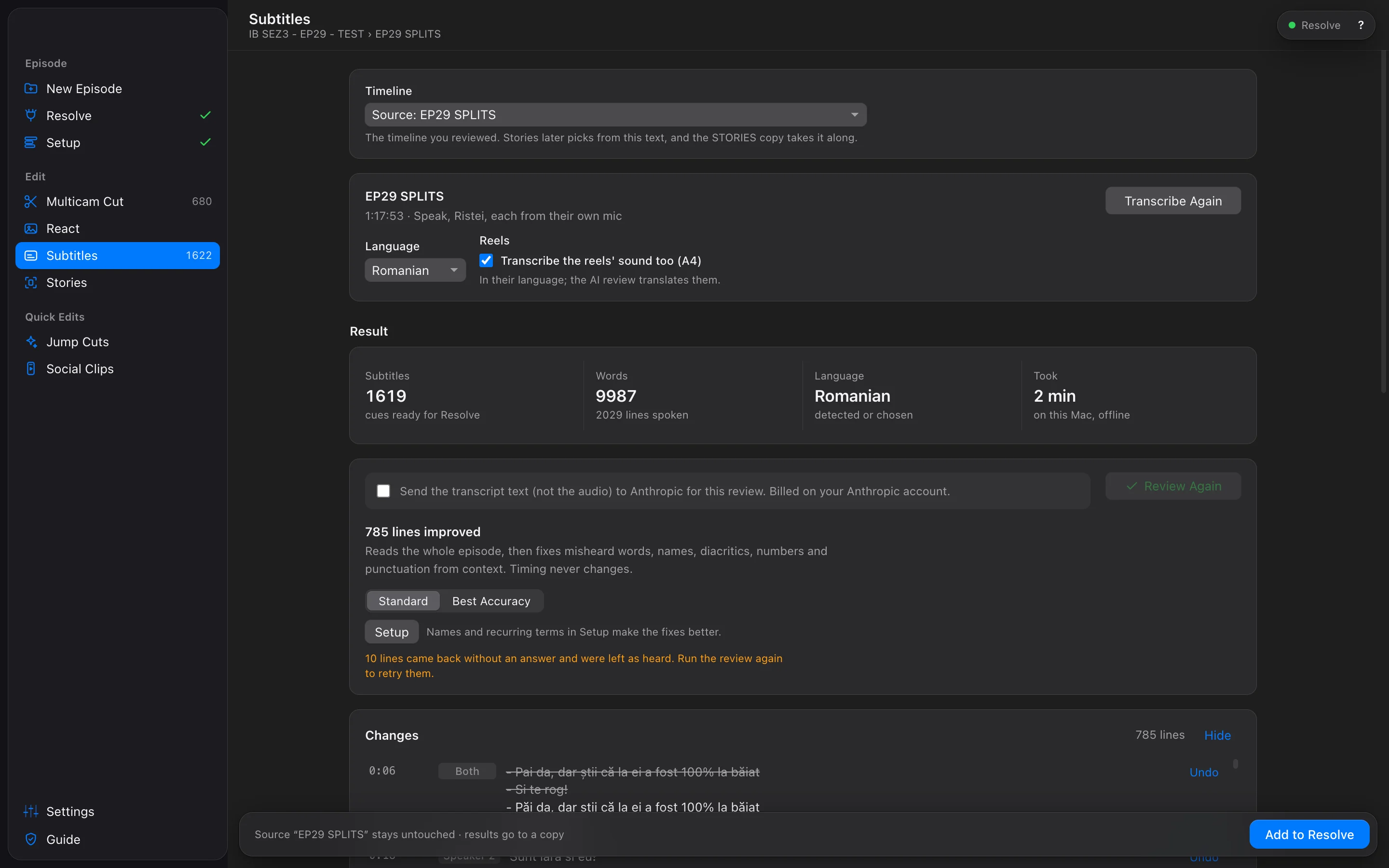
SOLD CUT Subtitles screen with the transcript of an episode
Stories · 9:16

Vertical stories, picked by AI, placed by you.

AI reads the reviewed episode and proposes stand-alone moments with titles. They land as green IN and red OUT markers you move in Resolve. Then one click builds only the stories, vertical, with the studio double frame.

React · Illustrations

The react layout, built for every clip.

While a reel plays, both close-ups sit either side of a phone, each followed by a Fusion composition that tracks the face, one keyframe a second. The reel's sound comes up; the room's screen audio goes down, exactly for that time.

  • Preview first: every illustration, what goes off, the face keys
  • Your own phone layout from two PNGs
  • Old timelines: illustrations found by their sound
Face framing

Every face, found and framed.

Apple Vision reads about 24 frames of each camera, on this Mac, and sets the vertical crop: face centred, eyes near the top third, zoom only when the face is small. It tells you when someone moves a lot.

Split screens

Splits, like you'd build them.

No two-shot camera? Each pair, everyone, or your own group, in side-by-side, stacked or grid layouts. Lines dragged by hand, cameras kept at their size, a compound clip per split, used whenever those people talk over each other.

Jump cuts

Tight, or just marked.

Choose the microphones, preview the quiet gaps, then build a tightened copy, or put a red marker on every gap and decide each cut yourself.

Social clips

Clips that follow the speaker.

Suggested moments from the transcript, or your own time ranges. Each clip is rebuilt vertical from the multicam cut, following whoever speaks, with the framing from Setup, then sent to Resolve's render queue.

  • Export jobs report real status from Resolve
  • Manual ranges work without a transcript
Safe by design

Your original is sacred.

Every step writes a new timeline next to the one before it. Nothing is overwritten, nothing is hidden, and a half-built copy is cleaned up if you stop.

Your timeline

EP29Read-only

Synced cameras and microphones. Read, never written.

→
Multicam

EP29 AUTO

The cut. Every angle kept underneath, disabled.

→
React · Subtitles

EP29 AUTO REACT

Phone layouts, face keys, subtitles on track 1.

→
Stories

EP29 STORIES

Only the stories, vertical, in their places.

Preview before every write

Analyze and Preview only read. The screen says which timeline it reads and which copy it will create, before you press anything.

Stop anytime

Cancel or quit mid-build and the unfinished copy is removed. The engine restarts on its own. You are never left with half an edit.

Verified, not assumed

After a build the app checks the copy it made. If something does not add up, it says so, with timecodes, instead of reporting success.

Private

Your footage stays home.

Everything heavy runs on your Mac: audio analysis, transcription, face detection. The only thing that can go online is transcript text, for the optional AI features, with your own key.

On your Mac, offline

Nothing to upload.

Audio analysis and camera choiceLocal
Transcription · Whisper large-v3Local · model downloads once, 2.9 GB
Face detection · Apple VisionLocal
Sync, splits, react builds, jump cutsLocal · in Resolve
Online, only if you choose

Your key, your bill.

AI subtitle reviewText only · Anthropic
AI story picksText only · Anthropic
Your API keymacOS Keychain
Audio and videoNever sent
Made for Mac

A real Mac app. Keyboard first.

Native window, system accent colour, light and dark. Every screen has a key, and the main action of any screen is always the same one.

⌘↩
Run the main action of the screen
⌘1…9
Jump between screens
⌘.
Stop the current operation
⌘⇧R
Refresh from Resolve
Why SOLD CUT

Pay once. Stop renting your workflow.

Automatic podcast editors are usually sold as monthly subscriptions. SOLD CUT is a one-time purchase with lifetime updates, built only for DaVinci Resolve: everything lands as real timelines, tracks and clips you already know how to edit.

What you pay over three yearslist prices, September 2026
SOLD CUT 2 Macs at once · lifetime updates
€150 once
AutoCut AI plan, annual
$536 $178.80 / year
AutoPod monthly, per licence
$1,044 $29 / month

Prices as listed on autopod.fm/pricing and autocut.com/en/pricing in September 2026, before taxes. AutoPod offers one month free per year on annual billing. AutoPod and AutoCut are trademarks of their owners; we are not affiliated with them.

01

One payment, two Macs at once

€150 covers your studio Mac and your laptop at the same time, with every update including the next major version. No subscription to remember, no editing tool that stops working when a card expires.

02

You don’t even open Resolve

Give it the folder with the episode’s raw files. It syncs every camera and microphone, starts DaVinci Resolve by itself and builds the project, the tracks and the timeline. From camera cards to a first cut without touching Resolve.

03

The whole podcast, not just the cut

From raw camera cards to a synced project, the multicam edit, split screens, react layouts with the phone, studio subtitles, 9:16 stories with the double frame, jump cuts and clips. One app, one workflow.

04

Rules from real episodes

Pacing, interruptions, when to go wide, how long to hold a reaction: tuned on hundreds of our own episodes, not on a demo clip. Pick a pace and it cuts the way a good editor would.

05

Works offline. On a plane, on set, anywhere.

Many AI editing plugins need a connection to their servers to work. SOLD CUT does the heavy lifting on your Mac: the cut, transcription, face framing and every build in Resolve work without internet, and your footage never leaves the machine.

06

Your original stays untouched

Every step writes a new copy next to the one before it, with every camera angle kept. If you do not like a choice, the alternative is one click away in Resolve.

Pricing

One price. Every feature.

● Launching soon
€150
One payment. Two Macs. No subscription.
  • Every feature: multicam, subtitles, stories, react, jump cuts, social clips
  • Active on two Macs at the same time, move a seat whenever you like
  • Lifetime updates, including the next major version
  • Works offline after activation
Tell me when it launches →

Secure checkout opens at launch. Taxes are shown before you pay.

What you need

Nothing to install besides Resolve. Python, FFmpeg and the analysis engine come inside the app. No Terminal, no Homebrew.

MacApple Silicon (M1 or newer), macOS 14 Sonoma or later
ResolveDaVinci Resolve Studio 19.1 or newer. The free edition does not let other apps control it.
Coming soonAdobe Premiere Pro, then Windows
One settingPreferences → System → General → External scripting using → Local
MediaSeparate cameras and a microphone per person. Mono, stereo and multitrack recorder files all work.
DiskAbout 3 GB for the speech model, downloaded the first time you use Subtitles
Questions

Straight answers.

Does it work with the free version of DaVinci Resolve?

No. Since version 19.1, only DaVinci Resolve Studio lets other apps control it through scripting, and that is how SOLD CUT builds your edit.

Will it change or damage my timeline?

No. Every operation writes a new copy ("… AUTO", "… REACT", "… STORIES"). Your timeline is only read. If you stop a build halfway, the unfinished copy is removed.

How does it decide which camera to show?

From the microphones. It measures who is speaking, who interrupts and for how long, then follows editing rules we tuned on our own shows: hold on real turns, absorb quick interjections, go wide on the right moments, use a group shot or split screen when two people talk over each other. You pick the pace and how eagerly it follows interruptions.

How many people and cameras?

Two to ten people, each with their own microphone (or their own channel on a multitrack recorder). Any number of cameras per person, plus wide shots, group shots and split screens.

Which languages can it transcribe?

Transcription uses Whisper large-v3, which handles close to a hundred languages. We test English and Romanian in our own studio. The optional AI review can translate reels into the language of your episode.

Do I need internet?

Only to activate the app, download the speech model once, and for the optional AI features. The multicam cut, transcription, face framing, splits, react builds and jump cuts all work offline: on a plane, on location, anywhere without a connection.

What do the AI features cost?

They use your own Anthropic API key and are billed by Anthropic directly, only when you use them. SOLD CUT adds nothing on top. Everything else in the app works without a key.

Windows? Premiere Pro?

Coming. Adobe Premiere Pro is next, then a Windows version. Today SOLD CUT runs on macOS with DaVinci Resolve Studio, and we ship each platform only once it cuts as well as the one we use every day.

Stop cutting podcasts by hand.

Give the first cut to SOLD CUT. Spend your hours on the edit only you can make.